Claims
The broker assists the customer with a claim; the carrier decides on cover and settlement. In Insurance Broker Core this is an Insurance Broker Claim Assistance Case. A customer complaint is an Insurance Broker Complaint Case. This page describes the forms, the roles that may see them, the checks on save, the two reports, and the one claim API function that exists.
Who does this
| Role | What the DocType permissions allow |
|---|---|
Insurance Broker Claims | Read, write, and create Claim Assistance Case. |
Insurance Broker Sensitive Claims | Read, write, and create Claim Assistance Case and Complaint Case; read Risk Object Version. This role is the explicit access to sensitive claim files. |
Insurance Broker Administrator | Read, write, and create Claim Assistance Case and Complaint Case. |
Insurance Broker Compliance | Read, write, and create Complaint Case. No access to the Claim Assistance Case DocType. |
The workspace Claims is visible to Insurance Broker Administrator, Insurance Broker Claims, and Insurance Broker Sensitive Claims. The reports Claims and Complaints can be run by Insurance Broker Administrator, Insurance Broker Operations, and Insurance Broker Compliance. Role names follow contracts/security/roles_baseline_v1.json; see Roles and access and Security and privacy.
Before you start
- The policy and a policy term exist (see Policies). The claim needs both links.
- The claimant exists as a party (see Parties).
- Saving a claim runs a capability gate for the process
claimsof the policy's product class. Without a matching admission the save stops withIBC-CAP-NOT-ADMITTED-001,IBC-CAP-BLOCKED-001, orIBC-CAP-UNRESOLVED-001.
Steps: open a claim from a policy
- Open the saved policy. The button New claim appears next to New policy term; it is not shown on an unsaved policy.
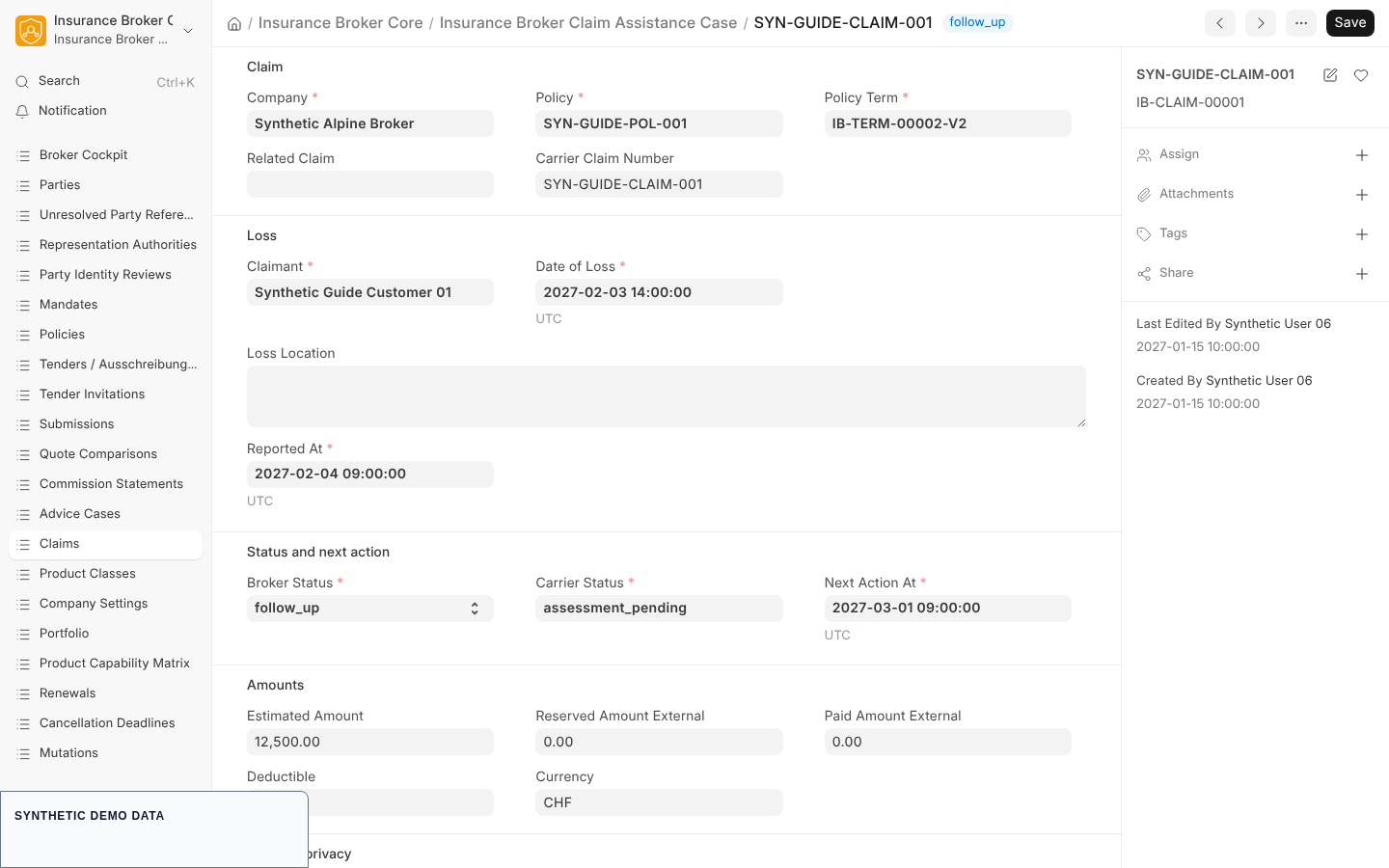
- Choose New claim. The new Claim Assistance Case opens with these fields filled from the policy: Company, Policy, Policy Term (the policy's Current Term), and Claimant (the policyholder). Correct them when the claim concerns another term or claimant.
- Complete the form. The record name follows the series
IB-CLAIM-plus a five digit counter; the Carrier Claim Number is the title once you enter it.
| Section | Field | Type | Notes |
|---|---|---|---|
| Claim | Company | Link to Company | Required. |
| Claim | Policy, Policy Term | Links | Required. |
| Claim | Related Claim | Link to another Claim Assistance Case | Optional. |
| Claim | Carrier Claim Number | Data | Optional. |
| Loss | Claimant | Link to Insurance Broker Party Identity | Required. |
| Loss | Date of Loss, Reported At | Datetime | Required. |
| Loss | Loss Location | Small Text | Optional. |
| Status and next action | Broker Status | Select | Required. Options: reported, documents_pending, submitted, follow_up, closed. |
| Status and next action | Carrier Status | Data | Required. Free text for the status the carrier reported. |
| Status and next action | Next Action At | Datetime | Required. |
| Amounts | Estimated Amount, Reserved Amount External, Paid Amount External, Deductible | Currency | Optional. |
| Amounts | Currency | Link to Currency | Optional. |
| Risk and privacy | Risk Objects, Coverages | JSON | Optional. |
| Risk and privacy | Data Classification | Select | Required. Options: confidential or restricted; default restricted. |
| Risk and privacy | Coverage Decision By Broker | Check | Must stay off. |
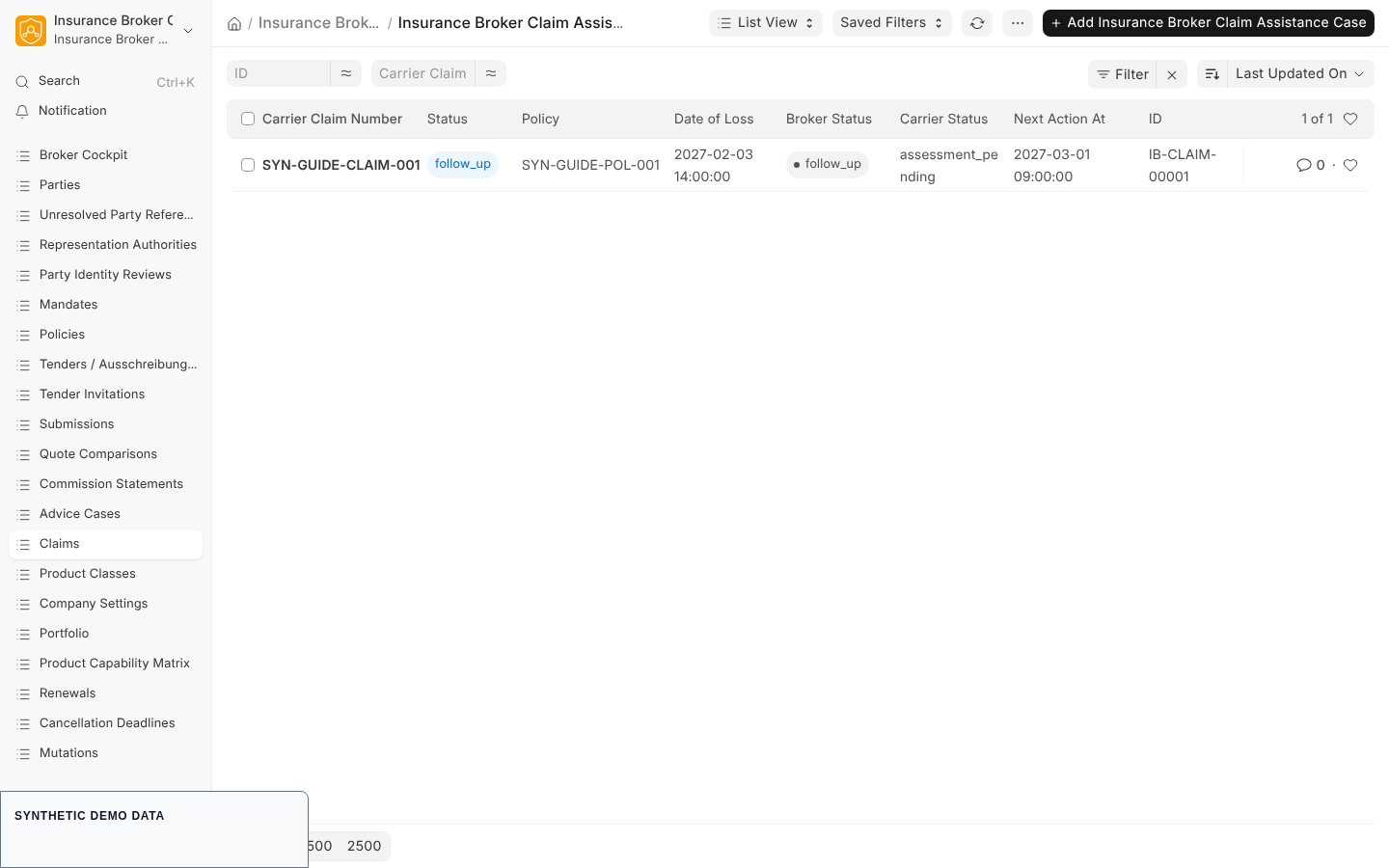
- Save. The list view loads Broker Status, Policy, Carrier Status, and Next Action At, with a status indicator. Search fields are Carrier Claim Number, Policy, Claimant, and Broker Status.
Sensitive data
Claims default to the classification restricted, and only the roles in the table above can read the DocType. The cockpit does not load restricted claim data for users without read permission on the claim DocType; see the dashboard description. Company Settings has a Restricted Data Enabled toggle; the activation code accepts it only when the isolation mode is one company per site. Read Security and privacy before you give anyone the Sensitive Claims role.
Steps: record a complaint
- Open the report Complaints from the Claims workspace to see existing complaints. There is no workspace shortcut for the Complaint Case form itself.
- Create the Complaint Case (series
IB-COMPLAINT-). Required fields: Company, Complainant (party), Received At, Category, Summary, Status (default received), Response Deadline (a link to an Insurance Broker Deadline, so create the deadline first, see Renewals and deadlines), Assigned To, and Complaint Register Reference. - Optional fields: Reference DocType and Reference (the record the complaint is about), Outcome, Closed At, and Delivery Evidence.
- Status offers received, investigating, response_due, resolved, closed, and reopened.
Reports
| Report | Filters | Columns |
|---|---|---|
| Insurance Broker Claims | Company (required), Status (matches Broker Status) | Policy, Policy Term, Carrier Claim Number, Broker Status, Carrier Status, Next Action At, Estimated Amount, Reserved Amount, Paid Amount, Currency, Coverage Decision |
| Insurance Broker Complaints | Company (required), Status | Reference DocType, Reference, Received At, Category, Status, Response Deadline, Assigned To, Outcome, Closed At, Register Reference |
Both are limited to the first 200 rows. The claims report sorts by Next Action At; the complaints report shows the newest complaint first. Neither report ships with a filter script, so the filter bar is not defined by the app; the report functions require the company value and reject unknown filter names.
The duration deadline function
The only claim function in the API module is insurance_broker_core.api.claims.ensure_duration_deadline (POST). It creates one Deadline for a claim once a caller-defined duration since Reported At has passed. It is called by a system or script, not from a Desk button.
| Parameter | Type | Required | Meaning |
|---|---|---|---|
| claim | string | yes | Name of the Claim Assistance Case. |
| config | object | yes | Keys rule_key (text), duration_seconds (positive integer), owner_user, timezone (UTC or an IANA name), calendar_profile. |
| as_of | timestamp | yes | The evaluation time you supply. |
The result status is below_threshold (nothing created, the due date is returned), created (a Deadline of type contractual with status overdue plus an event), or idempotent_replay (the existing deadline is returned). A missing config key is rejected with a code such as IBC-CLAIM-DEADLINE-CONFIG-001 or IBC-CLAIM-DEADLINE-OWNER-001; an unknown claim with IBC-CLAIM-DEADLINE-REFERENCE-001. The function creates no task and sends no message.
What the system checks
| Check | Code |
|---|---|
| Company, policy, date of loss, reported at, broker status, carrier status, or classification missing | IBC-CLAIM-REQ-001 |
| Coverage Decision By Broker is ticked | IBC-CLAIM-NO-COVERAGE-DECISION-001 |
| Related Claim is the claim itself or belongs to another company | IBC-CLAIM-LINK-SCOPE-001 |
| No matching claims capability admission | IBC-CAP-NOT-ADMITTED-001, IBC-CAP-BLOCKED-001, IBC-CAP-UNRESOLVED-001 |
| Complaint set to closed without Outcome or Delivery Evidence | IBC-COMPLAINT-CLOSE-001 |
| Status of a saved complaint changed by an ordinary form save | IBC-STATE-MACHINE-STATUS-SAVE-001 |
State machines in short
The contract claim_v1 defines reported, assisting, awaiting_carrier, closed, and cancelled with the commands start_assistance, await_carrier, close, reopen, and cancel for Insurance Broker Sensitive Claims. The contract complaint_v1 defines received, investigating, response_due, resolved, closed, and reopened with commands for Insurance Broker Compliance; resolve needs a maker and checker approval. The Broker Status options on the claim form are different words from the contract states: State machines.
What this page does not cover / current limits
- No Desk path for claim or complaint commands is evidenced. The Desk offers the forms, the New claim button, the list view, and the reports. No button for the commands above exists in the Desk scripts.
- The system records the carrier's status and the external amounts; it makes no coverage decision (the check above blocks the flag).
- File handling for claim documents follows the document rules in Privacy, evidence, and documents.
- Task and communication creation lie outside the Core; the duration function only stores a deadline and emits an event.
Capability status
contracts/w0/capability_matrix_v1.json lists the process claims. The default status is model_only for DE, AT, and CH, and the list validated_claims is empty. For special classes the matrix sets claims to manual_only for KVG, not_applicable for Fonds, and blocked for Diverse. Only a validated status may be claimed publicly.