Renewals and deadlines
Renewal work in Insurance Broker Core rests on three things: the Cancellation Deadline stored on a policy term, the Insurance Broker Deadline records that track due dates, and the Insurance Broker Renewal Case that follows one renewal. This page shows how to find upcoming dates in the two reports and what the records contain. It also states which parts have no evidenced Desk workflow.
Who does this
| Role | What the permissions allow |
|---|---|
Insurance Broker Operations | Read, write, and create Renewal Case and Deadline; run both deadline reports. |
Insurance Broker Manager | Read, write, and create Renewal Case. |
Insurance Broker Administrator | Read, write, and create Renewal Case and Deadline; run both reports. |
Insurance Broker Compliance | Read Deadline; run both reports. |
Insurance Broker Auditor, Insurance Broker Read Only | Read Renewal Case and Deadline. |
The role names follow contracts/security/roles_baseline_v1.json. See Roles and access.
Before you start
- Policy terms exist with an Effective Until or a Cancellation Deadline date (see Policies).
- You are authorized for the company. A report refuses to run without a company filter, and refuses a company you have no access to.
Steps: find upcoming renewals
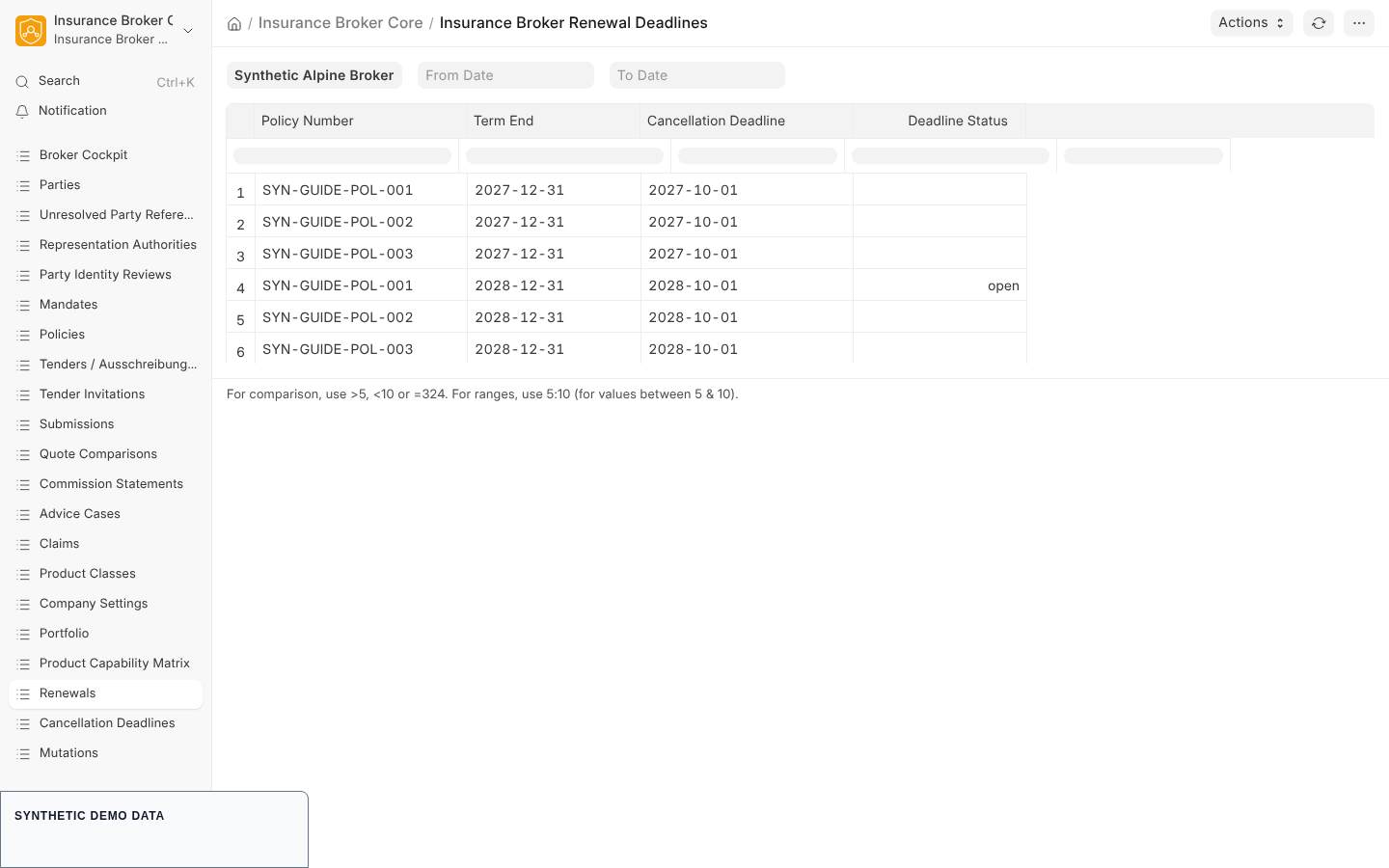
- Open the workspace Renewals/Deadlines (or the main Insurance Broker workspace). It holds the shortcuts Policies, Renewals, and Cancellation Deadlines. Open the shortcut Renewals. It opens the report Insurance Broker Renewal Deadlines.
- Set the filter Company (required). Optionally set From Date and To Date.
- Run the report. The date filters compare against the Cancellation Deadline of the term, or the Effective Until date when no cancellation deadline is set.
- Read the columns:
| Column | Meaning |
|---|---|
| Customer / Party | Display label of the policyholder. |
| Policy, Policy Number, Policy Term | The policy and the term the row is about. |
| Term End | Effective Until of the term. |
| Cancellation Deadline | Cancellation Deadline of the term. |
| Deadline, Due At, Deadline Status | A linked Insurance Broker Deadline of type renewal or cancellation for that term, if one exists. |
- Rows are sorted by the deadline due date, then the cancellation deadline or term end, then the policy number. The report includes draft and submitted terms and leaves out cancelled ones.
Steps: find cancellation deadlines
- Open the shortcut Cancellation Deadlines in the workspace. It opens Insurance Broker Cancellation Deadlines.
- Provide the company. The code also accepts the two filters from_date and to_date and rejects any other filter name.
- The columns are Policy, Term Version, Effective Until, and Cancellation Deadline. The result is sorted by cancellation deadline (or Effective Until) and limited to the first 200 rows.
Only Insurance Broker Administrator, Insurance Broker Operations, and Insurance Broker Compliance can run these two reports; other roles get a permission message. The cancellation report has no filter script of its own in the Desk code, so the filter bar is not defined by the app; the report function itself requires the company value.
The Renewal Case record
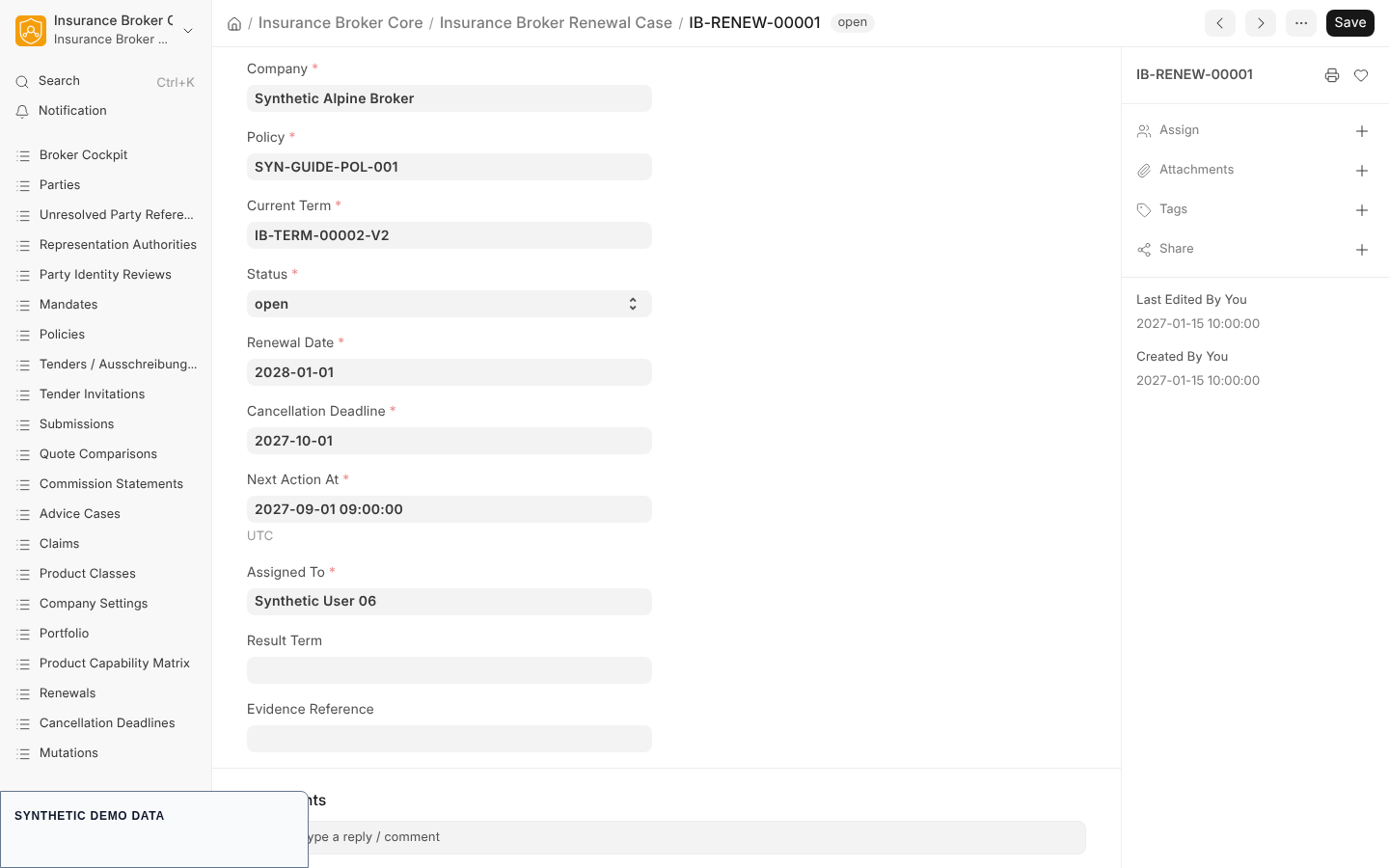
The record Insurance Broker Renewal Case has the series IB-RENEW- plus a five digit counter.
| Field | Type | Notes |
|---|---|---|
| Company | Link to Company | Required. |
| Policy | Link to Insurance Broker Policy | Required. |
| Current Term | Link to Insurance Broker Policy Term | Required. |
| Status | Select | Required. Options: open, review, offer_requested, decided, renewed, terminated. Default open. |
| Renewal Date | Date | Required. |
| Cancellation Deadline | Date | Required. |
| Next Action At | Datetime | Required. |
| Assigned To | Link to User | Required. |
| Result Term | Link to Insurance Broker Policy Term | Optional; the term that results from the renewal. |
| Evidence Reference | Data | Optional. |
The workspace has no shortcut for the Renewal Case list; the Renewals shortcut opens the report, not this record.
The Deadline record
The record Insurance Broker Deadline has the series IB-DEADLINE-.
| Field | Type | Notes |
|---|---|---|
| Company | Link to Company | Required. |
| Reference DocType, Reference | Link and Dynamic Link | Required. The record the deadline belongs to. |
| Deadline Type | Select | Required. Options: regulatory, contractual, cancellation, renewal, complaint, privacy. |
| Due Date | Datetime | Required. |
| Timezone, Calendar Profile | Data | Required. |
| Status | Select | Required. Options: open, due, overdue, completed, waived. Default open. |
| Owner User | Link to User | Required. |
| Escalation User | Link to User | Optional. |
| Completed At | Datetime | Optional. |
| Evidence Reference | Data | Optional; must be unique across deadlines. |
A related record, Insurance Broker Regulatory Contractual Deadline (series IB-RCD-), holds a deadline derived from a rule contract: Deadline Type (contractual or regulatory), Source Rule, Calculation Basis, Calendar, Due At, Warnings, Owner, optional Delegate, Evidence Reference, and Status (open, completed, waived).
What the system checks
| Check | Code |
|---|---|
| Running a report without a company | message: Select a company before running this report. |
| Running a report for a company you cannot access | message: You do not have access to this company. |
| Running a report without an allowed role | message: You do not have permission to run this insurance report. |
| Duplicate Evidence Reference on a Deadline | duplicate-value error from the unique field |
| Changing the Status of a saved Renewal Case by an ordinary form save | IBC-STATE-MACHINE-STATUS-SAVE-001 |
The cockpit also shows a count of renewals within 90 days and overdue deadlines; see the dashboard description in the source repository.
State machine in short
The contract renewal_v1 defines the states opened, review, offered, accepted, declined, and expired, with the commands start_review, record_offer, accept, decline, and expire. The accept command needs a maker and checker approval. The status options on the Renewal Case form use different words (see the table above), so treat the contract as the reference for transitions: State machines.
What this page does not cover / current limits
- No Desk path for renewal commands is evidenced. The Desk code has no list script, no form script, and no button for the Renewal Case, and the status cannot be moved by saving the form.
- No code in the Desk creates Deadline records for renewals automatically. The reports show a linked deadline only when one exists.
- The reports read policy terms; they do not create tasks or send reminders.
Capability status
contracts/w0/capability_matrix_v1.json lists the process servicing. The default status is model_only for DE, AT, and CH, and the list validated_claims is empty. Only a validated status may be claimed publicly.