Policies
A policy in Insurance Broker Core is an Insurance Broker Policy record that points to its policyholder, its mandate version, its product class, and its regulatory context. The commercial content lives in separate Insurance Broker Policy Term records. A term is submitted once and never edited afterwards; a change is recorded as a new term. This page explains the forms, the checks the system runs on save, and the limits of what the Desk offers today.
Who does this
| Role | What the DocType permissions allow |
|---|---|
Insurance Broker Operations | Read, write, and create Policy, Policy Term, Policy Mutation, Risk Object, and Policy Carrier Participation. Cannot submit a term. |
Insurance Broker Manager | Read, write, and create Policy and Policy Term and Policy Mutation. Cannot submit a term. |
Insurance Broker Approver | Read, write, and submit Policy Term. This is the checker role for a term. |
Insurance Broker Administrator | Read, write, create, and submit Policy Term; read, write, and create Policy. |
Insurance Broker Compliance | Read Policy and Policy Term; read and write Policy Mutation and Policy Carrier Participation. |
Insurance Broker Auditor, Insurance Broker Read Only | Read only. |
Role names follow contracts/security/roles_baseline_v1.json. All records are company bound: you only see and create records for companies you are authorized for. See Roles and access.
Before you start
- The company is activated (see First steps and activation).
- The policyholder exists as a party and a mandate version exists for it (see Parties and Mandates).
- A product class exists (see Product catalog) and a regulatory context exists for the policyholder.
- Submitting a Policy Term runs a capability gate for the process
servicingof the policy's product class. Without a matching admission the submit stops withIBC-CAP-NOT-ADMITTED-001,IBC-CAP-BLOCKED-001, orIBC-CAP-UNRESOLVED-001.
Steps: create the policy
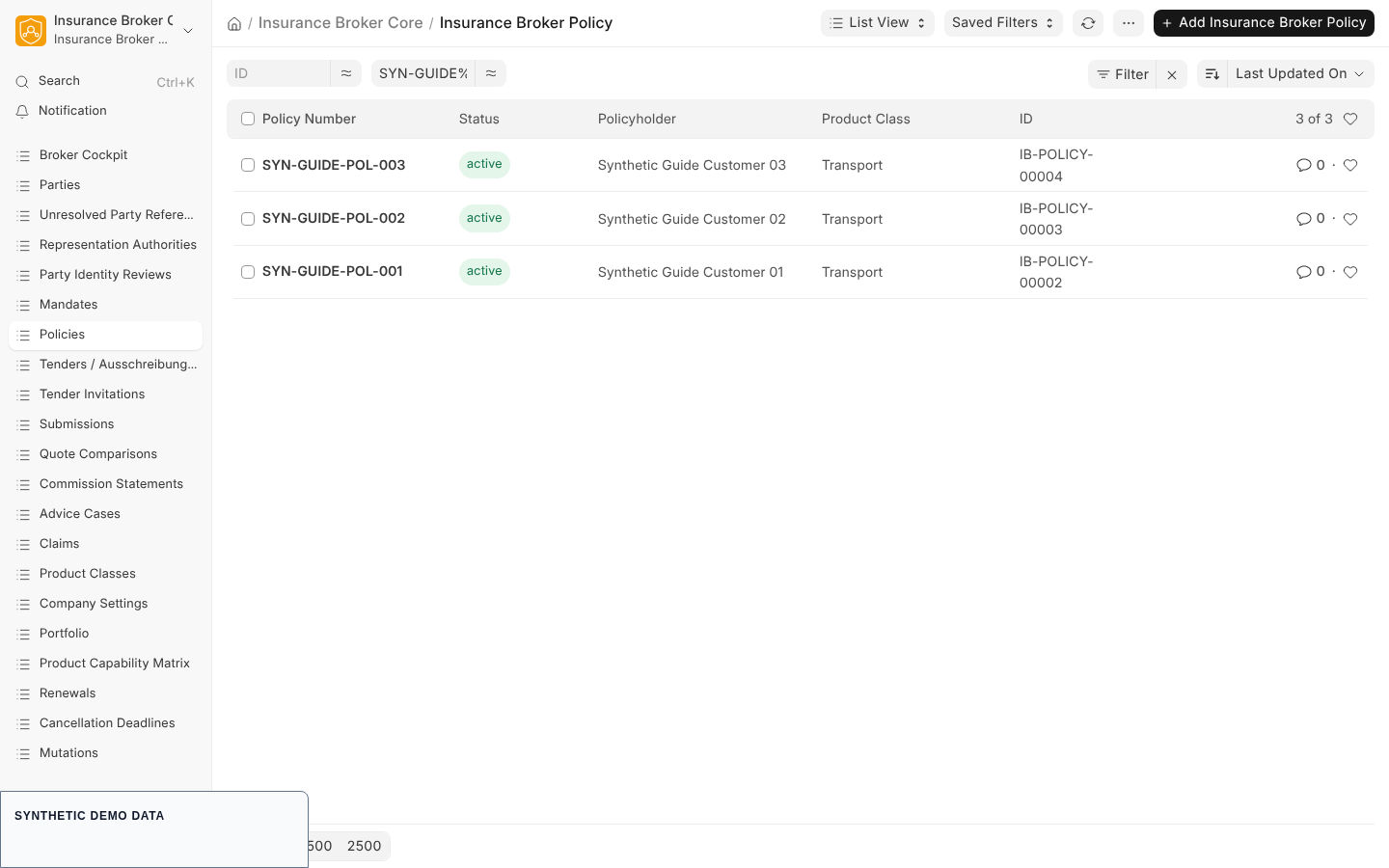
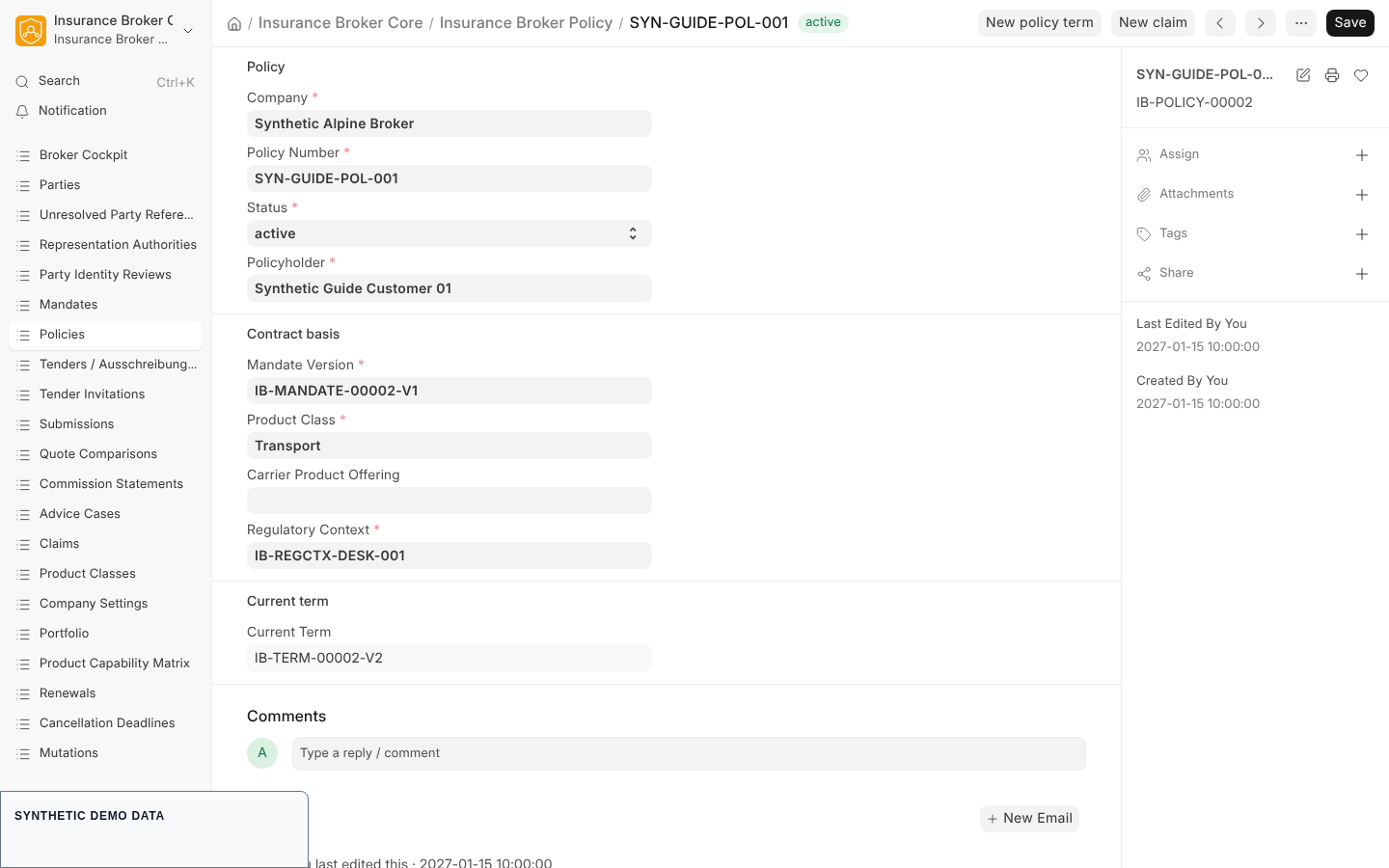
- Open Policies from the Insurance Broker workspace (or from the workspace named Policies) and choose to add a new record. The record name follows the series
IB-POLICY-plus a five digit counter. - Fill the required fields:
| Field | Type | Notes |
|---|---|---|
| Company | Link to Company | Required. |
| Policy Number | Data | Required. The list and form use it as the title. |
| Status | Select | Required. Options: draft, active, suspended, cancelled, lapsed, expired, void_ab_initio. Default draft. |
| Policyholder | Link to Insurance Broker Party Identity | Required. |
| Mandate Version | Link to Insurance Broker Mandate | Required. |
| Product Class | Link to Insurance Broker Product Class | Required. |
| Carrier Product Offering | Link to Insurance Broker Carrier Product Offering | Optional. |
| Regulatory Context | Link to Insurance Broker Regulatory Context | Required. |
| Current Term | Link to Insurance Broker Policy Term | Read only. You cannot type into it. |
- Save. The list view shows Status, Product Class, and Policyholder next to each policy.
Steps: add a policy term
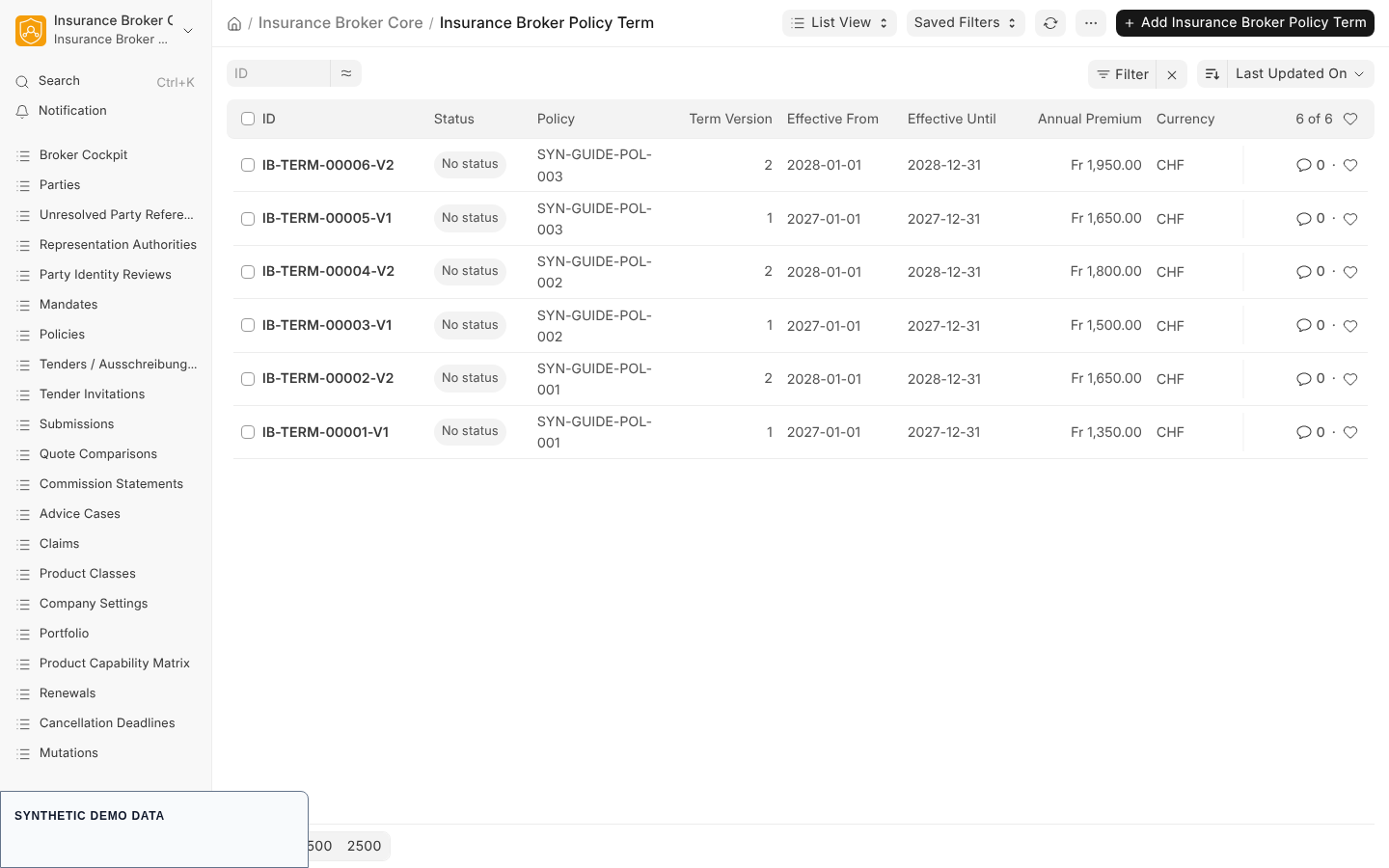
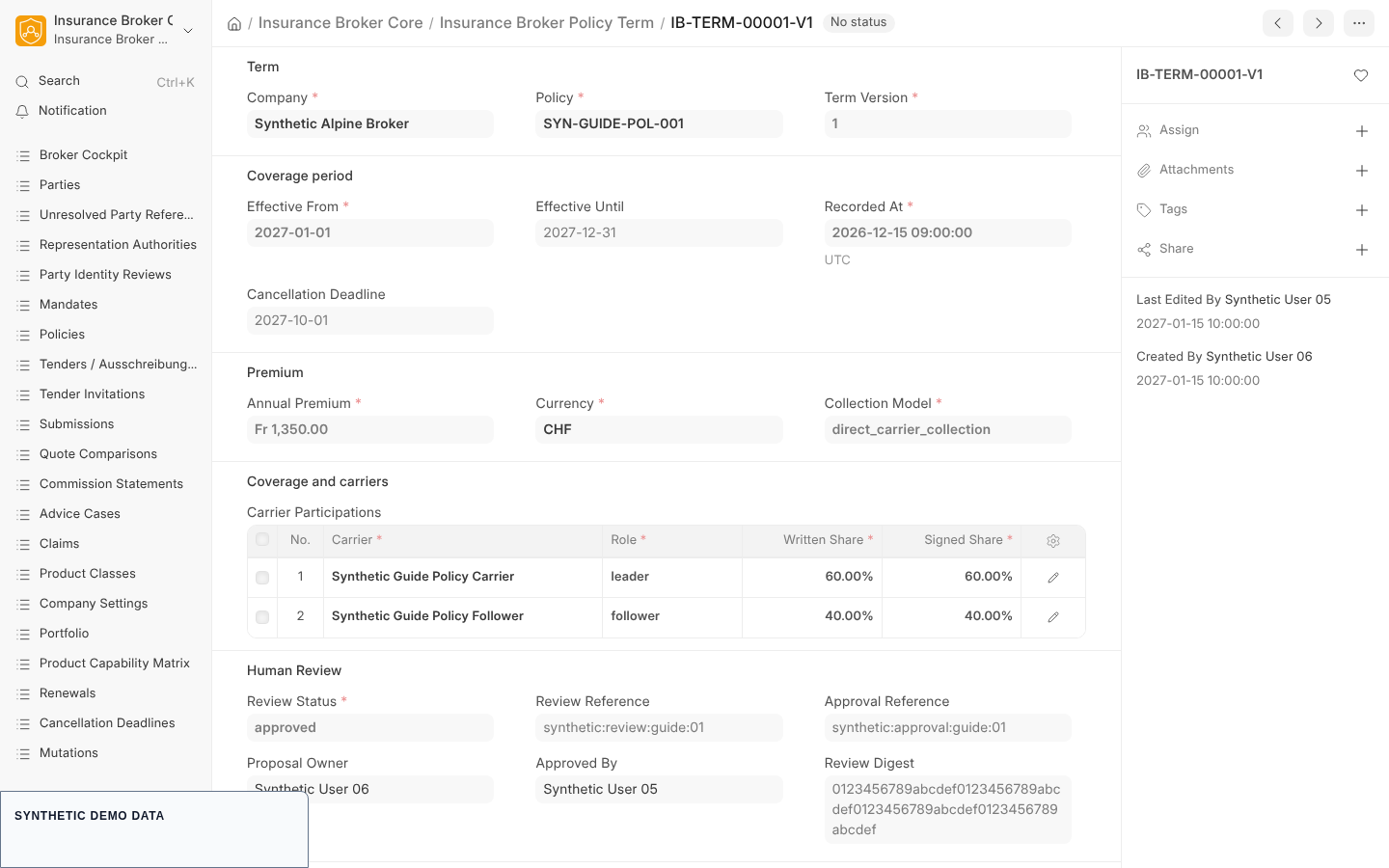
A term carries the dates, the premium, the coverages, and the carrier shares. Terms are bitemporal: Effective From and Effective Until say when the cover applies, Recorded At says when the broker recorded it.
- Open a saved policy. The buttons New policy term and New claim appear only on saved policies, not on a new one.
- Choose New policy term. The form opens with Company and Policy already filled in. The record name follows
IB-TERM-plus a counter and-Vplus the term version. - Fill the term:
| Field | Type | Notes |
|---|---|---|
| Term Version | Int | Required, default 1. Version 1 has no Previous Term. |
| Previous Term | Link to Insurance Broker Policy Term | Required from version 2 on. |
| Effective From | Date | Required. |
| Effective Until | Date | Optional; an open end is allowed. |
| Recorded At | Datetime | Required. |
| Cancellation Deadline | Date | Optional. The renewal and cancellation reports read it, see Renewals and deadlines. |
| Annual Premium | Currency | Required. |
| Currency | Link to Currency | Required. |
| Collection Model | Select | Required. The only option is direct_carrier_collection. |
| Coverages | Table of Insurance Broker Coverage | Rows with Coverage Code and Label (both required), Limit, Sublimit, Deductible, Currency, Clauses, and Exclusions. |
| Carrier Participations | Table of Insurance Broker Carrier Participation | Required. Rows with Carrier (a Supplier), Role (leader or follower), Written Share, Signed Share, External Reference. |
- In the Human Review section the fields Review Status, Review Reference, Approval Reference, Proposal Owner, Approved By, and Review Digest are read only. The proposal owner is set to the signed-in user when the term is created.
- Save the term. A submitted term can no longer be changed.
Carrier shares
The written shares of all rows must add up to 100 percent, and the signed shares must add up to 100 percent. A deviation of up to 0.01 is tolerated. An empty table is rejected. Two other tables exist for related facts: Insurance Broker Policy Carrier Participation (a stand-alone record per carrier with Written Share, Signed Share, Effective From, Evidence Reference, and Contract Version) and Insurance Broker Policy Risk Participation (links a term to a risk object version with a Participation percent, default 100).
Risk objects
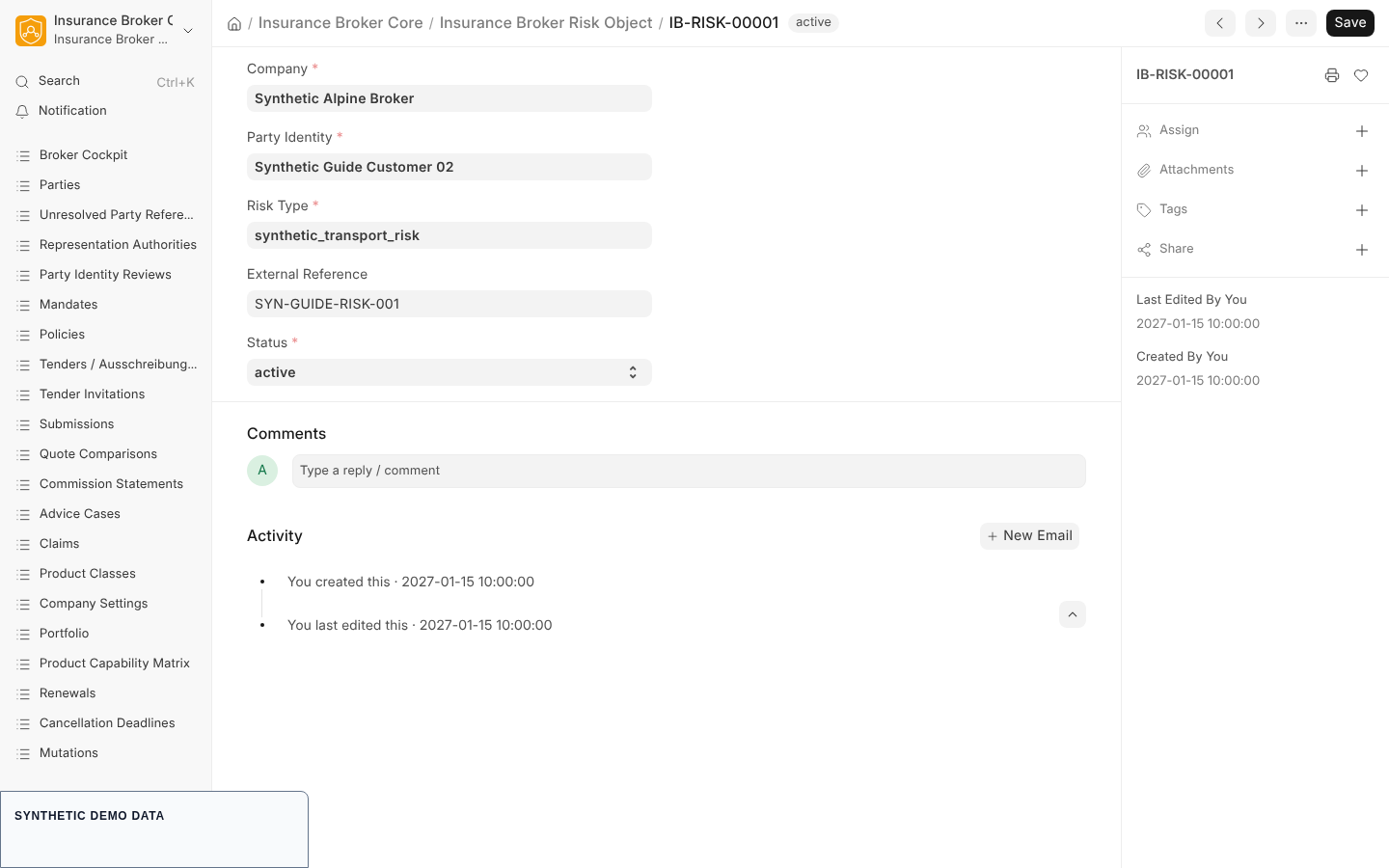
An Insurance Broker Risk Object (series IB-RISK-) names what is insured: Company, Party Identity, Risk Type, optional External Reference, and Status (active or inactive). The attributes are stored in versions: an Insurance Broker Risk Object Version has a Version number, Effective At, Recorded At, Attributes (JSON), a Data Classification (internal, confidential, or restricted, default confidential), and a link to an Insurance Broker Risk Schema Version for the product class. Operations and Administrator can create risk objects and versions.
Change a policy: new term instead of overwriting
The system does not edit a submitted term. To change dates, premium, coverages, or shares, create a new term with Term Version one higher, Previous Term set to the old term, and a Recorded At that is not earlier than the old term. The old term stays as it was, so you can still answer what you knew at a given time.
The record Insurance Broker Policy Mutation (series IB-MUT-) documents a change: Policy, Source Term, optional Result Term, Mutation Type (endorsement, correction, cancellation, reinstatement, replacement), Effective At, Recorded At, Status (draft, review, approved, applied, rejected), Retroactive Reason, and Evidence Reference. If Effective At is earlier than Recorded At, a Retroactive Reason is mandatory. A mutation with status applied needs a Result Term. The report Mutations lists mutations for one company and can be filtered by status.
What the system checks
| Check | Code | What you see |
|---|---|---|
| Required term details missing | IBC-POLICY-TERM-REQ-001 | Complete the required policy-term details before saving. |
| End date before start date | IBC-POLICY-TERM-DATE-001 | The end date cannot be before the start date. |
| Period overlaps another term of the same policy (the previous term is excluded from the comparison) | IBC-POLICY-TERM-OVERLAP-001 | The period overlaps another active term. |
| Collection model other than direct_carrier_collection | IBC-POLICY-COLLECTION-001 | Only direct collection by the carrier is accepted. |
| No carrier row | IBC-CARRIER-SHARE-EMPTY-001 | Add at least one carrier participation. |
| Written or signed shares not 100 percent | IBC-CARRIER-SHARE-TOTAL-001 | Shares must each total 100 percent. |
| Change to a submitted term | IBC-POLICY-TERM-IMMUTABLE-001 | Create a new policy term instead. |
| Version above 1 without Previous Term | IBC-POLICY-TERM-LINEAGE-001 | A later term must reference its previous term. |
| Previous Term not submitted or from another policy | IBC-POLICY-TERM-LINEAGE-002 | The previous term must be submitted and belong to the same policy. |
| Version not exactly previous plus one | IBC-POLICY-TERM-LINEAGE-003 | The version must be one higher. |
| Recorded At earlier than the previous term | IBC-POLICY-TERM-RECORDED-001 | The recorded time cannot be before the previous term. |
| Submit without approved review | IBC-POLICY-TERM-REVIEW-REQUIRED-001 | A term must be approved before submission. |
| Approver is the same user as the proposal owner | IBC-POLICY-TERM-MAKER-CHECKER-001 | Maker and checker must differ. |
| Approval without the Approver role (System Manager is also accepted) | IBC-POLICY-TERM-APPROVER-ROLE-001 | The approver role is required. |
| Approved fields changed afterwards | IBC-POLICY-TERM-BINDING-HASH-001 | Approved term fields are immutable. |
| Mutation backdated without reason | IBC-MUTATION-RETROACTIVE-001 | Retroactive Reason required. |
| Mutation applied without Result Term | IBC-MUTATION-TERM-001 | A Result Term is required. |
The status of a saved policy, mutation, quote, advice case, renewal case, or complaint cannot be changed by an ordinary form save. A save that changes the status of an existing record is rejected with IBC-STATE-MACHINE-STATUS-SAVE-001.
State machines in short
The contract policy_v1 knows the states draft, active, suspended, cancelled, expired, and void_ab_initio, with the commands activate, suspend, reinstate, cancel, expire, and void. Activation, cancellation, and voiding use a maker and checker approval. The contract mutation_v1 knows proposed, review, applied, and rejected, with the commands submit_review, approve_apply, and reject. See State machines.
What this page does not cover / current limits
- No Desk command path for policy or mutation commands is evidenced. The Desk offers the forms and the two buttons above. No button for activate, suspend, cancel, or approve is defined in the Desk scripts.
- The approval step of a term is not a Desk form action. Review Status is read only on the form. The service that creates a successor term (
insurance_broker_core/services/policy_terms.py) sets the approval programmatically and requires two distinct users; it is not wired to a Desk button. - Current Term on the policy is read only and is set by that service, not by the form.
- Premium collection stays with the carrier; see Core domains.
Capability status
contracts/w0/capability_matrix_v1.json lists the process servicing and the default status model_only for DE, AT, and CH. The list validated_claims is empty. Only a validated status may be claimed publicly. Read docs/operations/en/capability_claims.md in the source repository for the rule.