Mandates
A mandate records the authority a client gives the broker: who the primary party is, which lines of business and risks are covered, which powers apply, and which evidence backs it. Policies refer to a mandate version. This page shows how to create and maintain a mandate in the Desk and is explicit about the one thing the Desk does not do: moving a mandate through its states is done with API commands, not with a form button.
Who does this
| Task | Roles |
|---|---|
| Create and edit a mandate | Insurance Broker Administrator, Insurance Broker Operations, Insurance Broker Manager |
| Edit a mandate | additionally Insurance Broker Compliance (no create right) |
| Read a mandate | additionally Insurance Broker Auditor, Insurance Broker Read Only |
| Request signature (API) | Insurance Broker Operations |
| Activate or revoke (API) | Insurance Broker Compliance, as checker, with a maker who is a different user |
Before you start
- The party exists and is bound to the company; see Parties.
- The company has an Insurance Broker Company Settings record with a country code. Activation reads it.
- You know the product classes the mandate must cover and their line-of-business codes; see Product catalog.
- Your user has a Company user permission if you are not an administrator; see Roles and access.
Steps
1. Create the mandate
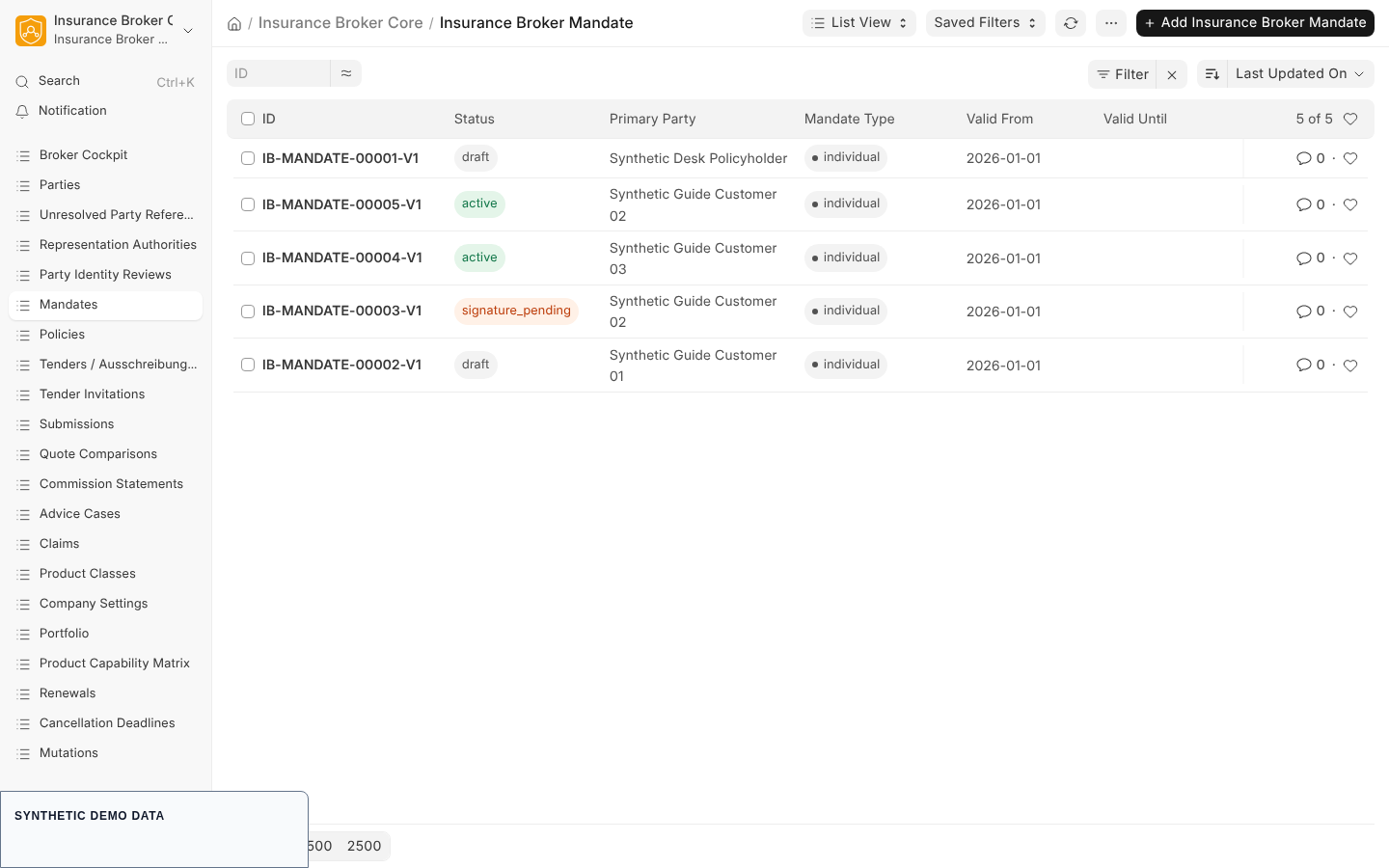
Create it from the New mandate button on a saved party identity, which pre-fills Primary Party, or open Mandates in the workspace and create a record. The record name follows the pattern IB-MANDATE-00001-V1: a five digit counter followed by the version.
2. Fill the Mandate section
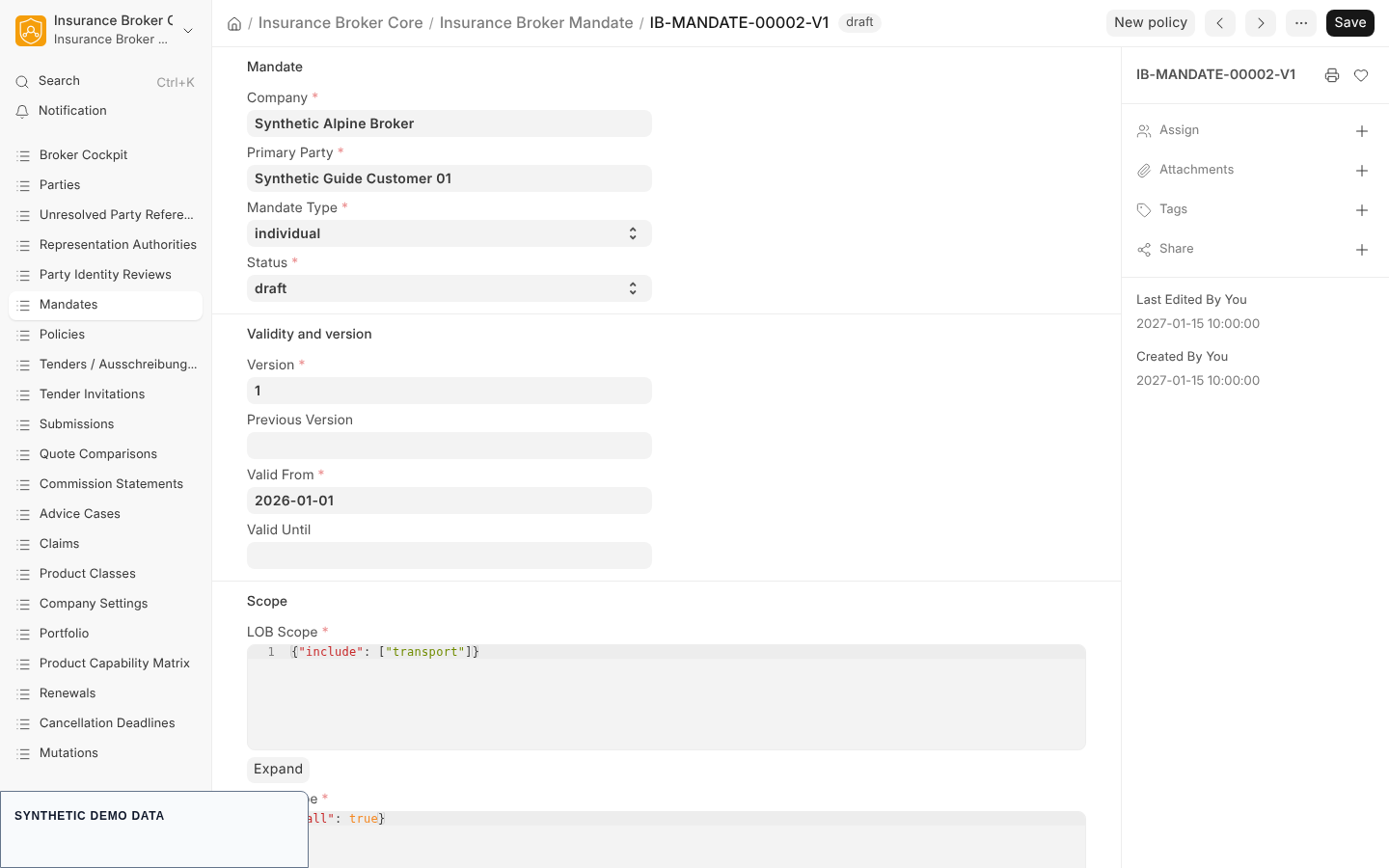
| Field | Type | Required | Meaning |
|---|---|---|---|
| Company | Link to Company | yes | the broker company |
| Primary Party | Link to Insurance Broker Party Identity | yes | the mandating party |
| Mandate Type | Select | yes | individual, group, limited_scope, or broker_of_record |
| Status | Select | yes | draft, signature_pending, active, revoked, terminated; default draft |
3. Fill the Validity and version section
| Field | Type | Required | Meaning |
|---|---|---|---|
| Version | Int | yes | default 1; cannot be changed after the first save |
| Previous Version | Link to Insurance Broker Mandate | no | the mandate version this one replaces |
| Valid From | Date | yes | start of validity |
| Valid Until | Date | no | end of validity; may not be before Valid From |
4. Fill the Scope section
All four scope fields are required JSON fields.
| Field | What the app checks |
|---|---|
| LOB Scope | must have one of the two shapes described below |
| Risk Scope | required; no further shape check in the form |
| Company Scope | required; no further shape check in the form |
| Authority Scope | required; no further shape check in the form |
LOB Scope accepts exactly one of two shapes:
| Shape | Content | Use |
|---|---|---|
all | the single key all set to true | display and import only |
include | the single key include holding a non-empty list of unique line-of-business codes, for example cyber and property | the shape that activation requires |
Unknown keys, an empty list, duplicate codes, or a mix of all and include are rejected. The codes in an include list are Line of Business codes (the LOB Code of Insurance Broker Line of Business). When a mandate is resolved, each code is matched against the primary and the secondary lines of business of every enabled product class, and the mandate covers the classes it finds. Every code must match at least one enabled class.
5. Fill the Authority, Responsibility, and Evidence sections
| Field | Type | Meaning |
|---|---|---|
| Broker Power, Communication Power, Receipt Power, Broker of Record, Collection Power Documented | Check | the powers the client granted |
| Collection Model | Select, required | only the value direct_carrier_collection exists, and it is the default |
| Advisor, Delegate | Link to Insurance Broker Party Identity | responsible parties |
| Power Evidence Reference, Signature Evidence Reference, Initial Disclosure Reference, Remuneration Agreement Reference | Data | references to the evidence |
| Revocation Reason | Small Text | reason, needed before a revocation |
6. Save and continue
Save the record. A saved mandate shows the button New policy, which opens a new Insurance Broker Policy with the company, the mandate version, and the policyholder pre-filled; see Policies. The mandate form lists connected policies under Portfolio.
Versioning
A mandate version is a record of its own. The Version field cannot be edited after the first save; trying to change it fails with IBC-MANDATE-VERSION-IMMUTABLE-001 ("Create a new mandate version instead of changing the version number."). To change the scope or powers of a mandate, create a new Insurance Broker Mandate for the same party, enter the next Version, and select the earlier record in Previous Version. The Desk shows no dedicated button for this; it is an ordinary new record.
States and commands
The state machine contract mandate_v1 defines five states and four commands.
| From | Command | Role | Approval | To |
|---|---|---|---|---|
draft | request_signature | Insurance Broker Operations | none | signature_pending |
signature_pending | activate | Insurance Broker Compliance | maker and checker | active |
active | revoke | Insurance Broker Compliance | maker and checker | revoked |
active | terminate | Insurance Broker Compliance | maker and checker | terminated |
revoked and terminated are end states. Every other combination of state and command is explicitly forbidden by the contract. See State machines for all aggregates.
Activation runs through the API only
There is no button on the mandate form for requesting a signature, activating, or revoking. The Desk form (mandate.js) offers only New policy. The commands exist as whitelisted POST functions in the module insurance_broker_core.api.mandates:
| Function | Purpose | Arguments |
|---|---|---|
insurance_broker_core.api.mandates.request_signature | draft to signature pending | mandate, idempotency_key |
insurance_broker_core.api.mandates.propose_activation | maker step, returns the binding a checker must sign | mandate, idempotency_key |
insurance_broker_core.api.mandates.activate | checker step, signature pending to active | mandate, approval_proof, idempotency_key |
insurance_broker_core.api.mandates.propose_revocation | maker step for revocation | mandate, idempotency_key |
insurance_broker_core.api.mandates.revoke | checker step, active to revoked | mandate, approval_proof, idempotency_key |
No function for the terminate command exists in this module. The status field itself is an editable selection on the form; the governed path for a status change is the command set above, which records a state transition receipt and writes the outbox event. This guide does not describe changing the status by hand.
What each command checks
| Command | Checks |
|---|---|
| all | the caller is authorised for the mandate's company (IBC-ACL-COMPANY-001) |
request_signature | a Signature Evidence Reference is present (IBC-MANDATE-SM-001); the caller holds the Operations role |
activate | the company has a country code (IBC-MANDATE-COUNTRY-001); the LOB Scope is an explicit include list (IBC-MANDATE-SCOPE-EXPLICIT-001); every code resolves to an enabled product class (IBC-MANDATE-LOB-UNRESOLVED-001); each resolved class has an eligible capability admission for the servicing process (IBC-CAP-NOT-ADMITTED-001, IBC-CAP-BLOCKED-001); a Power Evidence Reference is present (IBC-MANDATE-SM-002); an approval proof from a different user than the mandate creator is valid and unused (IBC-MANDATE-APPROVAL-MAKER-001); the caller holds the Compliance role (IBC-STATE-ROLE-001) |
revoke | a Revocation Reason is present (IBC-MANDATE-SM-004); the same approval and role rules apply, and no capability check is made |
The maker is the user who created the mandate. The maker calls the propose function, the checker signs the returned binding into an approval proof, and the checker calls the activate or revoke function. A retry with the same idempotency key returns the stored result; reusing a key for another mandate or command is rejected.
An all scope is useful for display and import and stays in the record, but activation refuses it. Name the classes explicitly with include before requesting activation.
What the form checks on save
| Rule | Message | Code |
|---|---|---|
| Company, Primary Party, Mandate Type, Valid From, Authority Scope, and Version are filled | Complete the required mandate details before saving. | IBC-MANDATE-REQ-001 |
Collection Model is direct_carrier_collection | Direct collection by the carrier is the only collection model in the data model. | IBC-MANDATE-COLLECTION-001 |
A mandate with status active has signature and power evidence | An active mandate requires signature and power-of-attorney evidence. | IBC-MANDATE-EVIDENCE-001 |
| Valid Until is not before Valid From | The mandate end date cannot be before its start date. | IBC-MANDATE-DATE-001 |
| LOB Scope has one of the two shapes | Use either an explicit non-empty LOB include list or all=true. | IBC-MANDATE-LOB-SCHEMA-001 |
| The version is unchanged after the first save | Create a new mandate version instead of changing the version number. | IBC-MANDATE-VERSION-IMMUTABLE-001 |
Errors are shown with the code in parentheses after the message.
Capability status
The capability matrix sets the default status of every capability to model_only and lists no validated claims. Mandate activation checks the capability admission for the servicing process of each product class in the scope. A class whose admitted status is blocked or model_only, or that has no admission, stops the activation. The register is capability claims.
What this page does not cover
- Producing the signed approval proof: the approval format is a contract of the app, and this guide documents no Desk screen for it.
- Termination of an active mandate: the contract defines the command; no API function or Desk control for it is in the repository.
- A print format for the mandate exists in the repository; its use is not described here.