Product catalog
The product catalog tells the app which kinds of insurance it can represent, so that portfolios can be loaded without losing information. It consists of Insurance Broker Product Class records (51 of them, created on installation), the Insurance Broker Line of Business records they point to, and, per company, offerings and versions of carrier products. This page shows where to find them and what the form checks. It describes records, not business readiness: see the capability status section.
Who does this
| Task | Roles |
|---|---|
| Read product classes and lines of business | Insurance Broker Administrator, Insurance Broker Operations, Insurance Broker Auditor, Insurance Broker Read Only (the Product Catalog workspace is also shown to Insurance Broker Manager and Insurance Broker Advisor) |
| Create, edit, and delete product classes and lines of business | Insurance Broker Administrator |
| Open the Product Capability Matrix report | Insurance Broker Administrator, Insurance Broker Operations, Insurance Broker Compliance |
| Create and edit Insurance Broker Product Capability records | Insurance Broker Administrator, Insurance Broker Compliance |
| Create and edit carrier product offerings | Insurance Broker Administrator, Insurance Broker Operations (delete: Administrator only) |
| Create and submit product versions | Insurance Broker Administrator, Insurance Broker Operations |
Before you start
- The app is installed. The product classes and lines of business are created by the installation; no manual entry is needed to get the 51 classes.
- For the report, you have a company you may see; see Roles and access.
Steps
1. Open the product class list
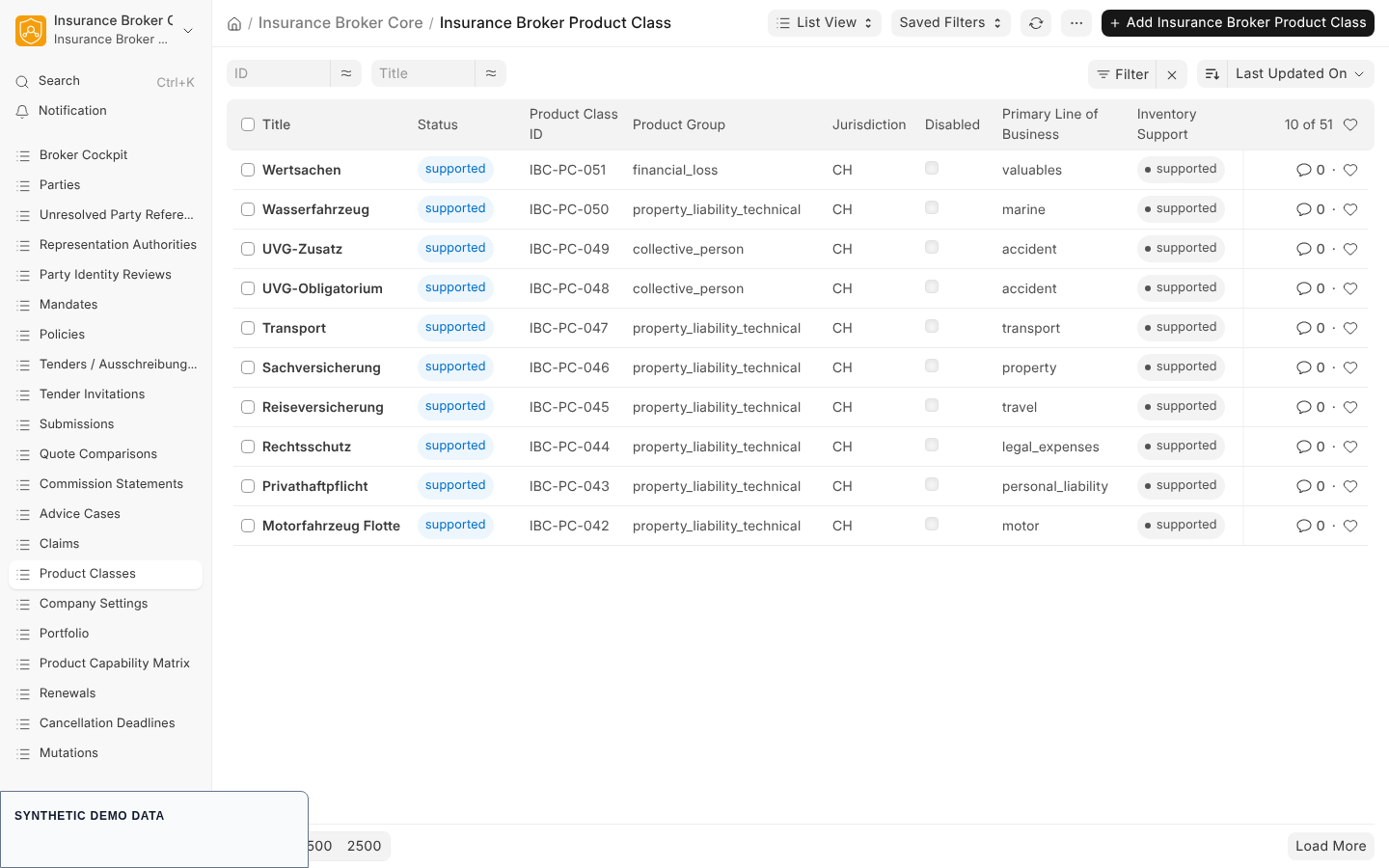
In the Insurance Broker workspace choose Product Classes. The Product Catalog block of the workspace holds the same shortcut together with the Product Capability Matrix report. The list is searchable by product class ID, title, product group, primary line of business, and jurisdiction, and shows an indicator based on the inventory support value.
2. Understand the 51 classes
Each product class has an ID of the form IBC-PC followed by a three digit number, from 001 to 051. The ID is the record name. Each class has a title, a product group, and a primary line of business. The seven product groups are property_liability_technical, financial_loss, collective_person, individual_person, bundle, non_insurance, and unclassified.
The titles are stored in German, for example Cyber-Versicherung, Rechtsschutz, and Motorfahrzeug. An English Desk session therefore shows German product class titles next to English labels. The product mapping document in the repository lists every class with its group and primary line of business (product mapping).
3. Open a product class
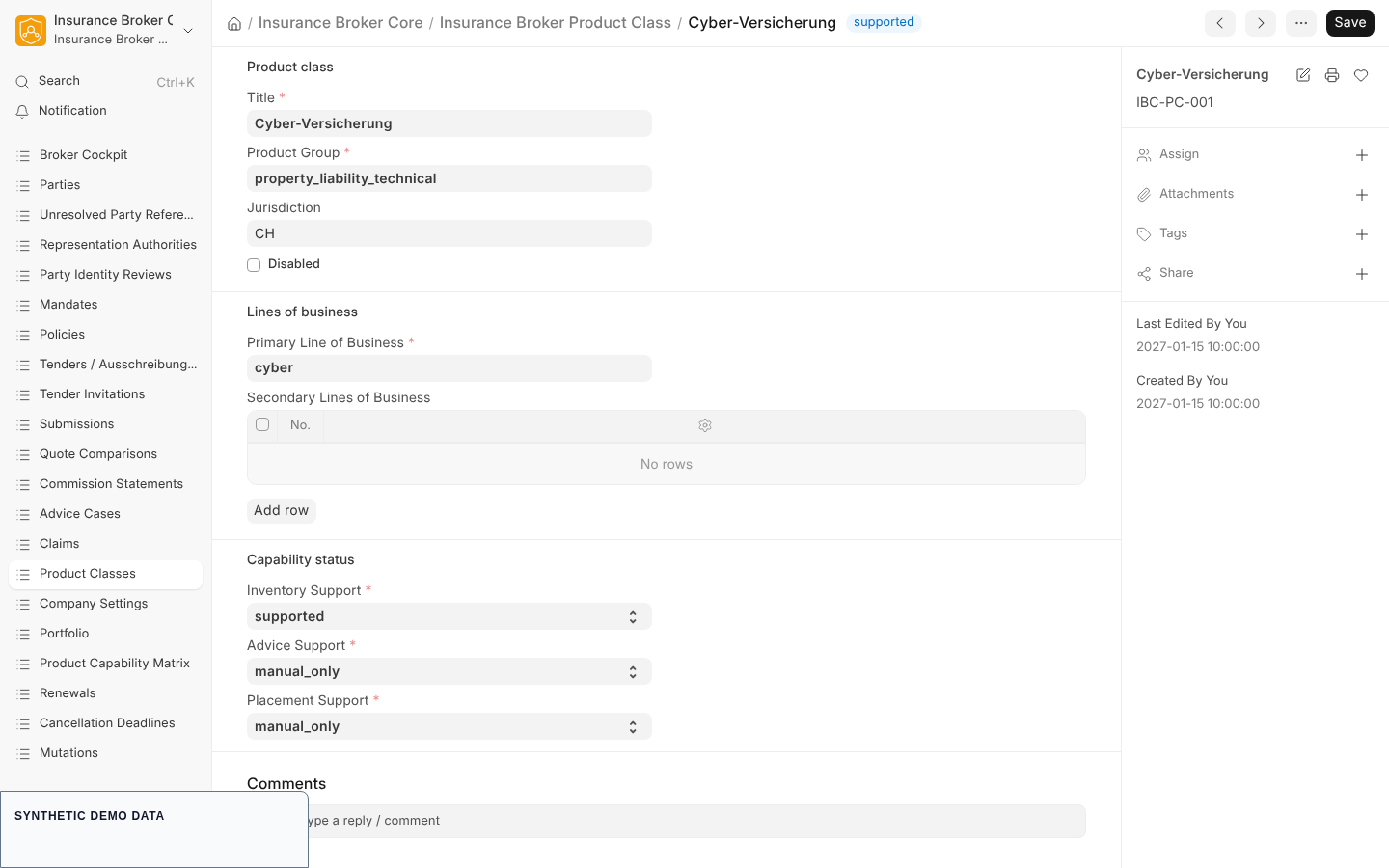
| Field | Type | Required | Meaning |
|---|---|---|---|
| Product Class ID | Data | yes, unique | the identifier, for example IBC-PC-001 |
| Title | Data | yes | display title |
| Product Group | Data | yes | one of the seven groups |
| Jurisdiction | Link to Insurance Broker Jurisdiction | no | set to the jurisdiction of the reviewed source state by the installation |
| Disabled | Check | no | disabled classes are ignored when a mandate scope is resolved |
| Primary Line of Business | Link to Insurance Broker Line of Business | yes | the main line of business |
| Secondary Lines of Business | Table of Line of Business | no | additional lines, one row each |
| Inventory Support | Select | yes | blocked, model_only, manual_only, supported, validated; default supported |
| Advice Support | Select | yes | same five values; default manual_only |
| Placement Support | Select | yes | same five values; default manual_only |
Product classes are shared reference data. They carry no company field and are not filtered by company. Only the Administrator role may change them. The form keeps a version history.
4. Know the special classes
| Classes | Inventory | Advice and placement |
|---|---|---|
IBC-PC-003 (Diverse) and IBC-PC-022 (Fonds) | model_only | blocked |
IBC-PC-021 (Epidemie), IBC-PC-031 (Kollektiv Krankentaggeld), IBC-PC-033 (Krankenkasse), the KVG classes | supported | blocked |
The installation seeds them this way and the form enforces it on every save; see the checks below.
5. Open the lines of business
An Insurance Broker Line of Business has a LOB Code (unique, the record name), a Title, and a Disabled flag. Its codes, such as cyber, property, motor, or liability, are the values used in the include list of a mandate scope; see Mandates. Only the Administrator can create or change them; Operations, Auditor, and Read Only can read.
6. Run the Product Capability Matrix report
Open Product Capability Matrix from the workspace or the sidebar. The report is a bounded projection of Insurance Broker Product Class records: at most 200 rows, newest change first, with the columns Name and Modified. The report requires a company, and the report definition ships no filter field of its own. If it answers "Select a company before running this report.", use the product class list instead, which shows the three support values of every class.
7. Capability records per company
Two further DocTypes record the capability level of a product class for a company. Neither has a workspace shortcut.
| DocType | Key fields | Notes |
|---|---|---|
| Insurance Broker Product Capability | Company, Product Class, Capability (inventory, servicing, advice, comparison, placement, commission, claims, privacy), Status (default blocked), Valid From (required), Valid Until, Evidence Reference | saving requires the Inventory Enabled toggle in the company's Insurance Broker Company Settings; Administrator and Compliance can create |
| Insurance Broker Capability Admission | Company, Tenant Reference, Country Code (DE, AT, CH), Product Class, Capability, Status, Version, Valid From, review references, Revoked | submittable; Administrator and Compliance can create and submit; this is the record the capability gates read, for example when a mandate is activated |
8. Carrier offerings and product versions
An Insurance Broker Carrier Product Offering (name pattern IB-OFFER) links a company, a carrier (an ERPNext Supplier), and a product class under an Offering Name, with an optional External Product Reference and a Disabled flag. An Insurance Broker Product Version (name pattern IB-PRODVER) belongs to an offering and carries a Version Identifier, Valid From, Valid Until, and references to the coverage template, the risk schema, and the source document. A product version is submittable: after submission it cannot be changed. Quotes are not part of the catalog; see Advice and quotes.
What the system checks
| Rule | Code |
|---|---|
KVG classes (IBC-PC-021, IBC-PC-031, IBC-PC-033) must keep Advice Support and Placement Support at blocked; the message says that KVG inventory does not permit advice or placement capability claims | IBC-PRODUCT-BOUNDARY-001 |
IBC-PC-003 and IBC-PC-022 must keep advice and placement blocked | IBC-PRODUCT-BOUNDARY-001 |
| The secondary lines of business must be unique and must not repeat the primary line | IBC-PRODUCT-LOB-001 |
| A submitted product version cannot be changed | IBC-PRODUCT-IMMUTABLE-001 |
| A product version end date may not precede its start date | IBC-PRODUCT-DATE-001 |
| A product capability needs the inventory toggle in the company's settings | IBC-COMPANY-SETTING-INVENTORY-001 |
| A product capability needs a company | IBC-CONTROLLER-COMPANY-001 |
Capability status
The capability matrix file sets the default status of every capability to model_only for CH, DE, and AT and lists no validated claims. Its processes are inventory, servicing, advice, quote_comparison, placement, commission_automation, and claims. For the special classes it records:
- Fonds: inventory
model_only; servicing, advice, quote_comparison, placement, and commission_automationblocked; claimsnot_applicable. - Diverse: inventory
model_only; every other processblocked. - KVG: inventory and servicing
supported; advice, quote_comparison, and placementblocked; commission_automation and claimsmanual_only.
The claim rule is that only a validated status may be claimed publicly. The capability claims register names the product-class inventory as a claim whose evidence is the product scope matrix verifier; the matrix file itself lists no validated claims.
To check the catalog against its contract, an operator runs these gates in the repository:
python scripts/verify_product_scope_matrix.py --check
python scripts/verify_product_taxonomy.py --check
What this page does not cover
- Adding a 52nd class: the repository requires an owner-approved change of the product class matrix and a green verifier first.
- How capability admissions are reviewed and submitted: the admission commands exist as API functions in the module
insurance_broker_core.api.capabilities; no Desk workflow for them is documented here. - The columns of the Product Capability Matrix report beyond Name and Modified.