Responses and comparison
Status: Insurance Broker Core version 1.0.0 is repo-ready; Tender commands are API-only and nothing is sent to carriers.
Once the invitations exist, the answers of the carriers have to be entered by a person: the system does not receive or read them. This page describes the commands that record a quote, a decline, a revision, or a not-considered decision, the command that builds the comparison, and how to look at the result in the Desk.
Today (API)
Who does this
Insurance Broker Advisor runs all commands on this page. Insurance Broker Administrator and Insurance Broker Advisor can create and edit the quote and comparison records. Insurance Broker Auditor and Insurance Broker Read Only can read them.
Before you start
- The tender and its invitations exist, see Prepare and invite.
- You know the company, the invitation names, and, for a revision, the quote names.
- Every command below is one call of
insurance_broker_core.api.tender.execute_tender_commandwith the command name in the first column of the tables and the fields listed there. The payload always carriescompany; the API checks that you may act for that company and that the record belongs to it.
Commands
| Command | Required fields | Role | Effect |
|---|---|---|---|
record_quote | company, invitation, values (an object) | Insurance Broker Advisor | Creates the Insurance Broker Submission with status submitted if the invitation has none, creates an Insurance Broker Quote with status received, sets the submission to quoted and the invitation to quoted. Returns the quote name. |
record_decline | company, invitation, reason | Insurance Broker Advisor | Creates the submission if needed, sets it to declined with the reason as carrier response, and sets the invitation to declined with the decline reason. |
mark_invitation_not_considered | company, invitation, decision, reason | Insurance Broker Advisor | Sets the invitation to not_considered with the reason. The decision is the name of the Insurance Broker Customer Decision linked on the tender. |
create_quote_revision | company, source_quote, revision_key | Insurance Broker Advisor | Creates a new version of a current quote and marks the source quote as no longer current. |
build_comparison | company, tender | Insurance Broker Advisor | Creates an Insurance Broker Quote Comparison and links it in the Quote Comparison field of the tender. |
Text fields must be non-empty text, otherwise the answer is IBC-TENDER-COMMAND-PAYLOAD-003; a missing field gives IBC-TENDER-COMMAND-PAYLOAD-002.
Steps: record a quote
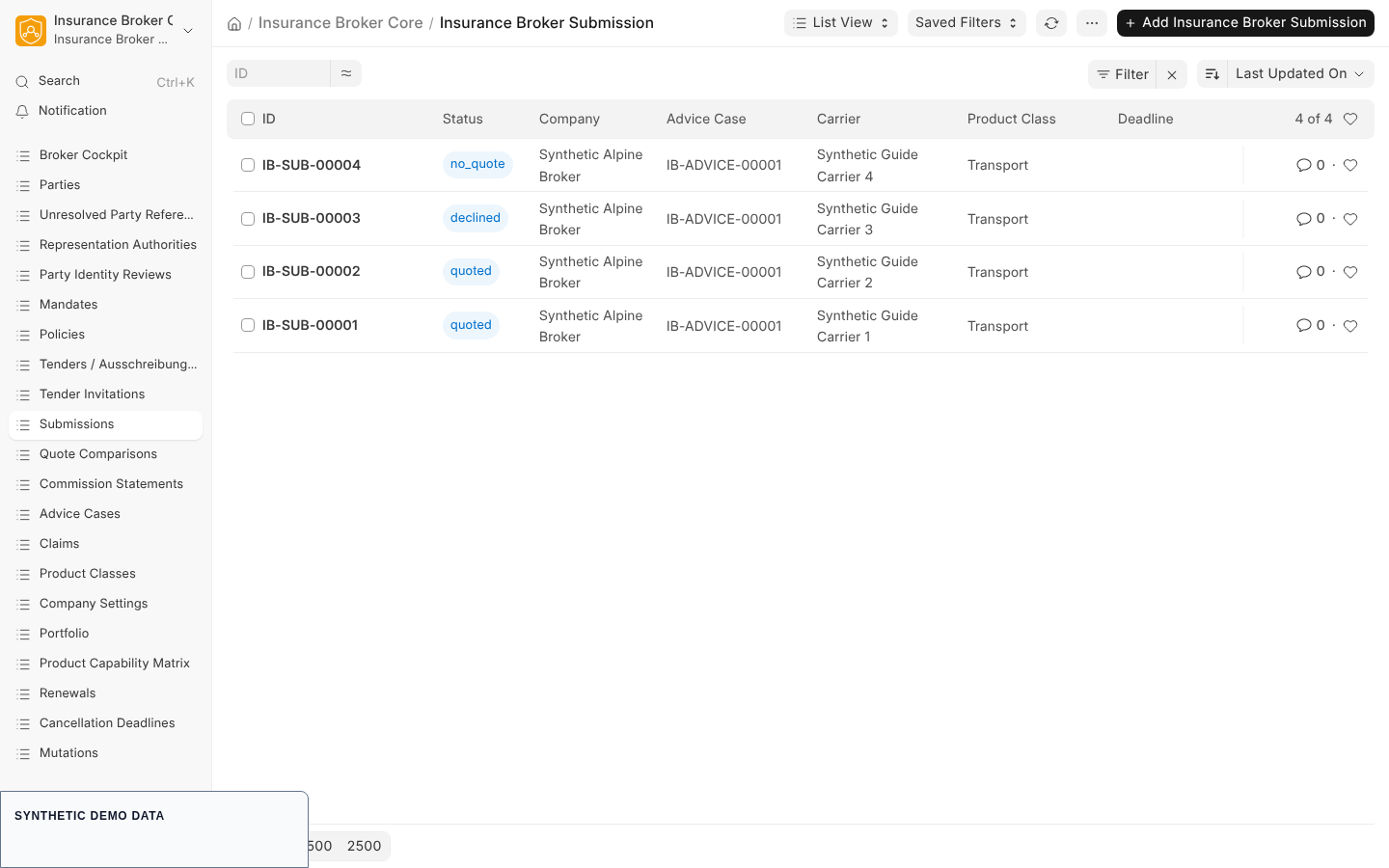
API-only synthetic response record: carrier answers are entered by a person or API call; the system does not read them from a carrier.
- Bring the tender to
responses_openwith the commands from the previous page. The commandrecord_quoteitself does not check the state of the tender. - Call
record_quotewithcompany, theinvitationname, and thevaluesobject described below. - Reload the invitation form. Its Status is
quotedand its Submission field is filled; its Sent At field is set by this step. - Open the new quote from the Submission or search the Insurance Broker Quote list to check the values.
The system fills company, advice case, submission, carrier, and status from the invitation and tender. The values object carries the rest of the quote:
| Value | Type | Required | Meaning |
|---|---|---|---|
product_version | link to Insurance Broker Product Version | Yes | The carrier product version quoted. |
quote_reference | text | Yes | The carrier's reference. |
coverage_basis_digest | text | Yes | A digest of the coverage basis; used to detect non-comparable quotes. |
terms_json | object | Yes | The quote terms. |
quote_version | whole number | No | Defaults to 1. |
is_current | yes or no | No | Defaults to yes. |
valid_until | date | No | Validity of the quote. |
annual_premium | currency amount | No | The annual premium. |
currency | link to Currency | No | The premium currency. |
document_reference | link to Insurance Broker Document Reference | No | A linked document. |
The call is rejected with IBC-TENDER-003 when the response deadline of the invitation has passed. Creating the submission is also checked against the capability admission, so a company without a valid admission for the product class gets IBC-CAP-NOT-ADMITTED-001, and a blocked or model-only class gets IBC-CAP-BLOCKED-001.
Steps: record a decline
- Call
record_declinewithcompany, theinvitation, and a non-emptyreason. - Reload the invitation: Status is
declinedand Decline Reason holds your text.
A decline excludes the invitation from the comparison. The call has no deadline check.
Steps: record a revision
- Call
create_quote_revisionwithcompany, thesource_quote, and arevision_keyof your choice. - The system creates a copy with the version number increased by one and the Previous Quote field set. The source quote is no longer current.
- Calling again with the same
revision_keyreturns the existing revision and creates nothing.
A source quote that is no longer current is rejected with IBC-QUOTE-REVISION-STALE-001; an empty key with IBC-QUOTE-REVISION-KEY-001. Build the comparison after revising, so that it lists the current version.
Steps: mark an invitation as not considered
This is meant for carriers that the customer did not select. Prepare the data first.
- Create an Insurance Broker Customer Decision in the Desk. Its required fields are Company, Advice Case, Decision, Decided At, Decision Maker, and Delivery Evidence; Selected Quote names the chosen quote.
- Open the tender and set its Customer Decision field to this record, then save.
- Call
mark_invitation_not_consideredwithcompany, theinvitation, thedecisionname, and areason. - Reload the invitation: Status is
not_consideredand Not Considered Reason holds your text.
Repeating the call with the same reason changes nothing. The system records the status only; it does not tell the carrier.
| Code | Meaning |
|---|---|
IBC-TENDER-009 | The reason is empty, the decision is not the one linked on the tender, or the decision, its selected quote, or the company scope does not fit the tender. |
IBC-TENDER-010 | The carrier of the selected quote cannot be marked as not considered. |
IBC-TENDER-011 | The invitation is already not considered with a different reason. |
Steps: build the comparison
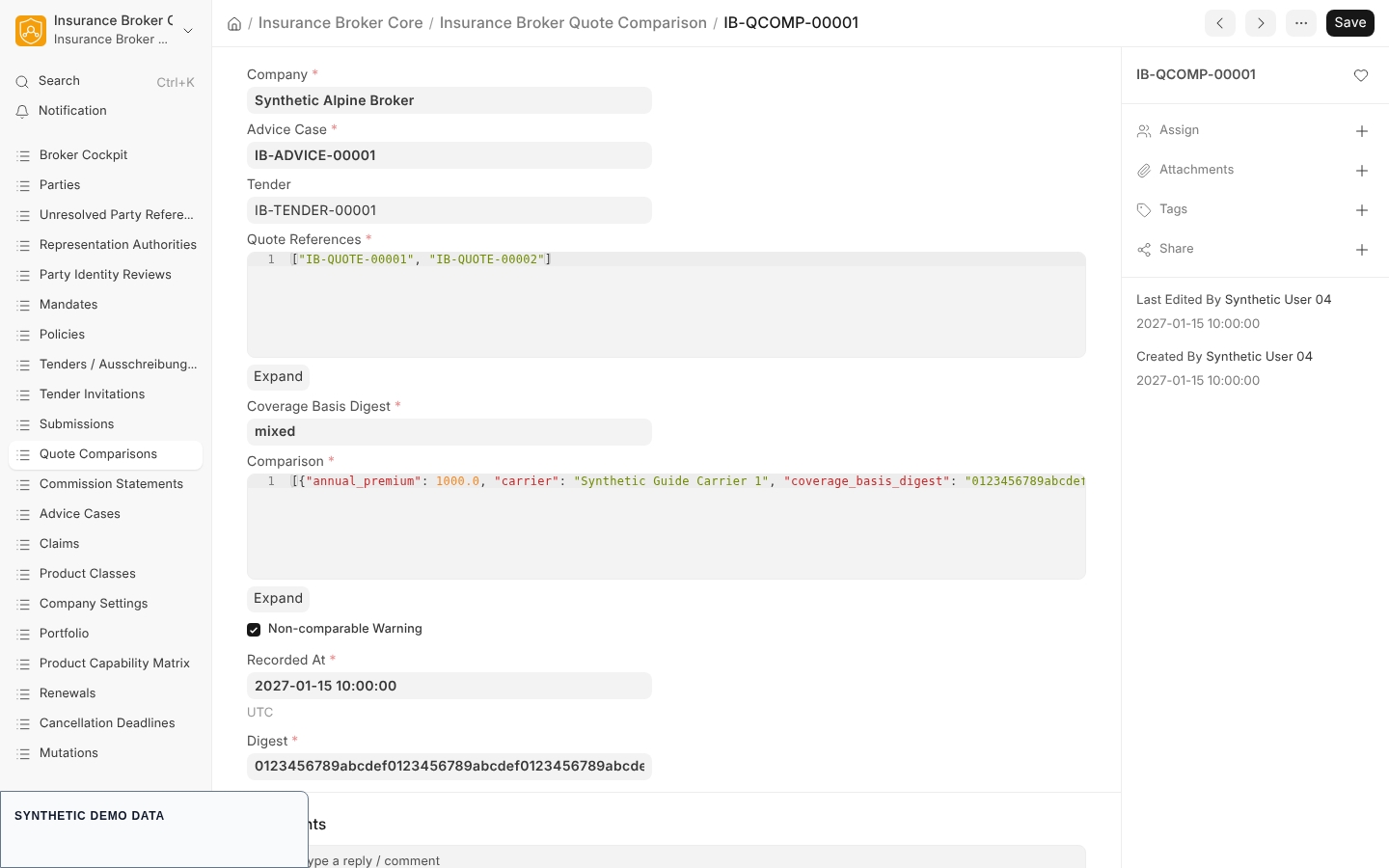
API-only synthetic comparison: it records comparable quotes but does not automatically rank them or choose a carrier.
- Call
build_comparisonwithcompanyand thetender. - Reload the tender: the Quote Comparison field now names the new record.
- Open the Insurance Broker Quote Comparison from the sidebar link Quote Comparisons.
The comparison contains every current quote with status received of the invitations that have status quoted. Declined and not considered invitations do not appear. It is a list of figures, not a ranking; the system does not choose a carrier.
| Comparison field | Meaning |
|---|---|
| Tender, Advice Case, Company | Where the comparison belongs. |
| Quote References | The names of the quotes included. |
| Comparison | The listed values per quote: name, carrier, annual premium, currency, coverage basis digest, quote version. |
| Coverage Basis Digest | The shared digest, or the text mixed when the quotes differ. |
| Non-comparable Warning | Checked when the quotes do not share one coverage basis digest. Treat the figures as not comparable. |
| Recorded At, Digest | When the comparison was written, and a digest of its content. |
When there is no received current quote, the call fails with IBC-TENDER-008. A quote reference check can also stop it if a reference is repeated, not current, or from another company.
Steps: continue the tender
After the comparison exists, run start_comparison with transition_tender while the tender is in responses_open. Without a linked comparison the command fails with IBC-TENDER-008. The tender then moves to comparison. The next step, recommend, is described on Recommendation and decision.
What the system checks
| Code | Meaning |
|---|---|
IBC-TENDER-003 | The response deadline of the invitation has passed. |
IBC-TENDER-005 | The invitation or submission does not fit the tender. |
IBC-TENDER-008 | No quote comparison, or no received current quote. |
IBC-TENDER-009, IBC-TENDER-010, IBC-TENDER-011 | Not-considered rules above. |
IBC-TENDER-COMMAND-ROLE-001 | The user lacks the Advisor role. |
IBC-TENDER-COMMAND-SCOPE-001 | The record is missing, belongs to another company, or the company is not authorized. |
Capability status
The capability matrix lists the process quote_comparison with default status model_only and no validated claims. The submission check uses the process name comparison. Only validated capabilities may be asserted publicly, and this page asserts none.
Related pages
Planned Desk workflow
A Desk workflow for tender commands is planned. This page does not describe it and gives no date and no scope.